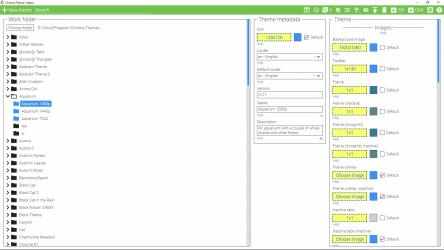
An app that lets you create themes for Chromium-based browsers.
★ Theme library
All your themes are stored on your machine and displayed within the app as a directory tree.
★ Full theme customization capabilities
Change any part of your theme that Chromium theme engine allows you to change. For example, you can set separate styles of a browser frame for active, inactive and incognito states.
★ Theme preview
Open your theme in any Chromium bowser with one click.
★ Pack your theme
You can pack your theme as a zip file by selecting it and clicking on the ZIP button. The resulting package will be put in the same folder where your theme is.
★ Changes history
Undo the changes you made to your theme.
★ Bulk copying
An advanced feature that lets you copy properties of one theme to others.
-------------------------------------------------------
How to install a theme created in ThemePath in the browser?
1. In ThemePath, select your theme and package it as crx by clicking on the "CRX" button.
1. In the browser, go to the chrome://extensions page.
3. Drag and drop the crx package into the "Extensions" page in your browser.
How to preview a theme in a browser other than Chrome?
The default preview button opens a theme in Chrome, but it's possible to preview theme in other Chromium-based browsers. Here's how:
1. Click on the "Options" button (gear icon) in the header.
2. In the opened popup, find the field "Paths to Chrome executables" and paste there a path to exe of the browser you want to preview a theme in. For example, for Edge it will be C:\Program Files (x86)\Microsoft\Edge\Application\msedge.exe.
3. In the same popup, find the field "Paths to Chrome user data folders" and paste there a path to any empty folder on your pc. For example: D:\edge.
4. Close the popup, and you should see the new button called "1" beside the default preview button in the header. Clicking on it will open the selected theme in Edge.
You can find more info on how to use advanced features by clicking on the "?" button within the app.
If you have an
Windows then you can download here
Chrome Theme Creator , app from the people of
Loftyshaky .
Loftyshaky has done it again! Welcome to the Chrome Theme Creator app...
Mobile application of the Chrome Theme Creator... Of all the versions of this program, we believe that
Windows is the most reliable and developed.