-
Downloads
-
Windows
-
Photos and videos
-
VideoMarkup - Video Editor
VideoMarkup - Video Editor
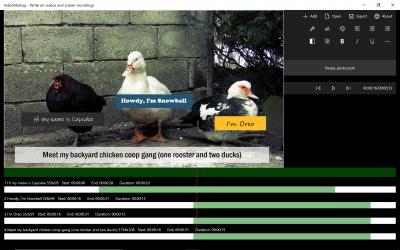
VideoMarkup is a powerful video editor designed for creators who want clear text, captions, subtitles, arrows, highlights, and other annotations directly on their videos. Whether you're editing tutorials, demos, school projects, or social media clips, this video editor gives you the control to produce clean, polished results from start to finish.
✂️ A Complete Video Editor for Everyday Projects
VideoMarkup includes the essential tools you expect from a modern video editor:
Trim and cut unwanted sections
Split long recordings into smaller clips
Merge multiple videos into a single sequence
Rearrange clips on a responsive timeline
Adjust playback speed
Extract segments for reuse
Reuse your favorite markups across projects
These core editing tools make VideoMarkup a reliable choice for anyone searching for a straightforward, capable video editor.
Add Text, Captions, Subtitles & Annotations
Enhance clarity and communication by adding visual callouts to your video:
Add text, captions, and subtitles
Draw arrows, shapes, and freehand highlights
Use blackout and whiteout tools to hide sensitive information
Keep every annotation perfectly synced to your timeline
This makes the app ideal for tutorial creators, educators, and anyone who needs a video editor that supports clear, instructional content.
Audio Tools for Narration & Music
Bring your audio to the same level of quality as your visuals:
Add background music
Generate narration using built‑in Text‑to‑Speech
Choose from multiple voices
Sync audio with simple timing controls
Flexible Export Options
Export your work in the format that fits your workflow:
Fully edited video with all annotations
Clean video without markups
All split clips exported as separate files
Markups saved for reuse
Text‑to‑Speech script exported as a text file
Extract audio as an MP3 file
Extract frames as high‑resolution images
Free‑Mode Watermarks
Videos exported in free‑mode include watermarks. You can remove them anytime by upgrading.
Perfect For
Tutorial and training videos
School projects and presentations
Social media content
App demos and walkthroughs
Annotating screen recordings
Highlighting steps, instructions, or key details
VideoMarkup: Write on videos & screen recordings puts you at the heart of the action ... That is why more than
907 people have downloaded this software at Downloads.com No great knowledge is required to be able to use
VideoMarkup: Write on videos & screen recordings . VideoMarkup: Write on videos & screen recordings 2021...
We have no doubt that
VideoMarkup: Write on videos & screen recordings is a good application for everything related to
Photos and videos . Welcome to VideoMarkup: Write on videos & screen recordings!
Upgrade to Pro:
Free editing exports videos with watermarks. If you like the free edition, we hope you'll upgrade to Pro for crammed-in fun of Pro-exclusive features with the ability to export videos without watermarks.
Annotate videos with text comments, arrows, screenshot layers, custom images, subtitles, outlines, opaque shapes, background sound, and free drawings.
This is the perfect marking tool for instructional videos, video demonstrations and screen shots. Your annotations are professionally "baked" into exported videos, so they always show up the moment you distribute your videos.