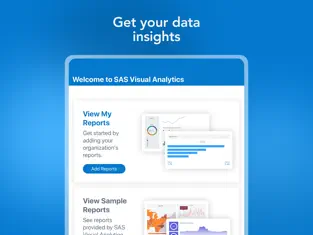
SAS® Visual Analytics empowers decision makers with business reports and dashboards anywhere, anytime! SAS® Visual Analytics App, part of the SAS Visual Analytics product family, enables you to view and interact with reports that can contain a variety of charts, graphs, gauges, tables, and other report objects.
With easy-to-use multi-touch gestures, you can move through the application, filter and drill into data in the reports, and make decisions in the office, in meetings, or out on the road. Business users can interactively explore vast amounts of data and collaborate with others via the SAS Visual Analytics App. When reports and data change, the app updates the view ensuring users are always up to date.
Requirements:
A supported version of SAS Visual Analytics:
•SAS Visual Analytics on SAS® Viya®
•SAS Visual Analytics 7.5 (SAS® 9.5)
SAS Visual Analytics server backend versions 8.5, 8.4, 8.3, and 7.5.
Highlights:
• Anywhere you go. You can work with reports whether you are connected or not.
• Interactive reports, dashboards and graphs. A variety of reports, dashboards, graphs, and gauges provide the customization and flexibility you need to meet your wide range of business demands.
• Multiple gestures. You can use familiar gestures, including pinch, zoom, tap, and multi-touch.
• Fast. Just as you’d expect – the application provides great response times and a fantastic experience while you work with your reports.
• Secure. Data access is based on user role and access permissions.
• Access to big data. You have the ability to access big data from SAS Visual Analytics. Release 7.5 is powered by SAS® LASR(TM) Analytic Server. Release 8.3 and later, on SAS Viya, are powered by SAS® Cloud Analytic Services (CAS).
License Agreement:
Your use of this application indicates your acceptance of the terms of the SAS Institute Inc. License Agreement for SAS® Visual Analytics App Software, linked to below. If you do not agree with these terms, you are not authorized to use the application.
Connect with SAS Visual Analytics efficiently and seamlessly... Most third-party programs currently offered are somewhat slow and tedious, which is not the case with
SAS Visual Analytics . Don't hesitate to download
SAS Visual Analytics for
Iphone if what you are looking for in Downloads.com is the best of
Economy and business SAS Visual Analytics has an interface that will allow the user to carry out operations without any complications. Como nos dijo Aitor Robles I think it’s time, app has worked great until last release and new release crashes as soon a you try to open a report
Of all the versions of this program, we believe that
Iphone is the most reliable and developed.
Advantages and disadvantages of SAS Visual Analytics
.