-
Downloads
-
Iphone
-
Utilities
-
PDF Editor ,PDF Book Reader ®
PDF Editor ,PDF Book Reader ®
PDF Editor ,PDF Book Reader ® Smart, Intuitive, and Apple Optimized
Experience the ultimate PDF solution, designed with Liquid Glass for a sleek, smooth, and visually stunning interface across all Apple devices.
CORE PDF FEATURES
Effortlessly read, edit, and create PDFs with a smooth, intuitive interface.
One-touch annotation and markup: highlight, underline, and add notes anywhere.
Draw or paint directly on PDFs with a full color palette.
Insert text boxes, headers, and footers.
Fill forms and create digital signatures, drag & drop signatures precisely.
Rearrange, add, or delete PDF pages easily.
Lock PDFs to protect sensitive documents.
Compress, zip, and print PDFs directly from your device.
Fully accessible for users with visual, motor, or cognitive disabilities.
PDF VIEWING AND READING
High-resolution display for crisp text and images.
Day & night modes for comfortable reading.
Search text and use Siri to find notes, open documents, and access PDFs instantly.
Zoom in/out seamlessly on text and images.
Tag, organize, and customize your PDF library for easy access.
Quick access via widgets, shortcuts, and Apple Watch support.
Take a summary using Apple Intelligence.
A PDF app designed with Liquid Glass for an enhanced user experience.
Listen to any book read aloud in natural voices, with each word highlighted as it's spoken. Adjust speed, pick your voice and language, and follow along page by page.
PDF EDITING AND ANNOTATION
Highlight, underline, and annotate PDFs with ease.
Draw, sketch, or paint anywhere using customizable colors and brushes.
Insert shapes, images, and photos, and customize text boxes with full control over font style, size, and color.
Real-time collaborative annotation via SharePlay.
Fill forms, invoices, and contracts with intelligent form recognition.
Digital signature creation and placement for effortless signing.
PDF CONVERSION AND SCANNING
Convert images, web pages, and camera photos into PDFs.
OCR text recognition for scanned documents. ( Image to Text )
Scan receipts, notes, contracts, and reports.
Batch scanning for multiple pages.
AI-enhanced processing for professional, high-quality PDFs.
PDF Converter for exporting files to multiple formats including HEIC, JPEG, PNG, TIFF, and PDF.
Create professional invoices and export them as PDFs to easily share, send, or print.
FILE MANAGEMENT AND ORGANIZATION
Save edits to new or existing PDFs.
Archive and share PDFs via AirDrop, iMessage, iCloud, and more.
Collaborative PDF workspace with annotation support.
Multi-language support for global accessibility.
SECURITY AND PRIVACY
Lock PDFs with a password.
No data collection; all documents remain private.
Customize PDF access and permissions.
CLOUD, SHARING, AND TRANSFER
iCloud integration for seamless syncing across Apple devices.
Share via AirDrop, iMessage, WhatsApp, Google Drive, and more.
Import/export PDFs from multiple platforms.
Quick, one-tap sharing options.
SUBSCRIPTION PRICE AND TERMS:
Your subscription automatically renews unless auto-renew is turned off at least 24 hours before
the end of the current period.
Payment will be charged to your iTunes account at confirmation of purchase. You can manage
or turn off auto-renew at any time from your iTunes Account Settings or via the “Manage
Subscription” option in the App Settings menu. Please note that refunds will not be provided for
any unused portion of the subscription term. Any unused portion of a free trial period will be
forfeited upon purchasing a subscription.
Terms of use: https://pdfeditorpdfbookreader.app/terms
Privacy policy: https://pdfeditorpdfbookreader.app/privacy
Don't hesitate to download
PDF Editor y Escáner for
Iphone if what you are looking for in Downloads.com is the best of
Utilities PDF Editor y Escáner has an interface that will allow the user to carry out operations without any complications. PDF Editor y Escáner Free Ringtone App.
PDF Editor y Escáner is at the top of downloads in its
Utilities category for
Iphone devices. El review de Abel Guerra It’s so easy to use and works wonderfully, good pdf app personally and perfect pdf reader and editor app specially for my Apple Watch
At the same time, it adds that it does not consume many resources, so it can be installed in almost any
Iphone . That is why more than
919 people have downloaded this software at Downloads.com Keep supporting
Milad fakhr and download its programs here quickly.
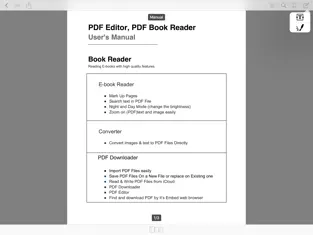
PDF Editor, PDF Book ReaderBook Reader (Reading e-books with high quality features)E-Book ReaderMarking pagesSearch text in PDF fileNight or day mode (change brightness)Zoom on text and image (PDF) easilyConverterConvert images and text to PDF files directly( jpeg, jpg, png )PDF DownloaderImport PDF files easilySave to a new file or overwrite an existing fileShare PDF files with iCloud, WhatsApp, Google Drive, DropBox and...Read and write PDF files from iCloudDownloader PDF EditorPDF Editorfind and download PDF using its built-in web browserPDF Creator (Create your own PDF)Type your textType your text without limitationAlign your textChange font sizeChange font colorPicturesInsert images from gallery or take by cameraDrag and drop image to any coordinatesResize imageRotate imageRemove image from en tradaSignatureCreate your own signatureChange the color or size of the signatureDrag and drop the signature to any coordinatesRotate the signatureAnnotation in PDF (PDF editor)Text boxChange the font color and font sizeChange the background color of the text boxes input textAdd text boxes in PDF files to type your own textAdjust text box sizeChange font color and font sizeDrag and drop boxes...