-
Downloads
-
Windows
-
Company
-
Miro: your visual workspace
Miro: your visual workspace
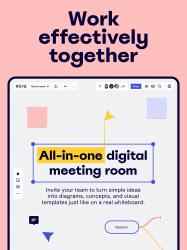
Miro is a visual workspace for innovation that enables distributed teams of any size to dream, design, and build the future together. With the magic of Miro's Intelligent Canvas™, visualizing concepts, ideas, and solutions as a team can happen anywhere — no dry-erase markers needed. Sync, flow, and feel the connection of working side by side with your team — even in remote, distributed, or hybrid work environments.
Our customers love using Miro to:
• Run engaging online or hybrid meetings
• Capture and brainstorm new ideas with a team
• Plan and manage agile workflows and scrum rituals
• Create user journeys, map processes, and develop personas
• Teach online classes and facilitate workshops
• Create vision boards of ideas and inspiration
With Miro for Windows devices, you can:
• Create, view, and edit multiple boards
• Share boards and invite team members to edit
• Review, add and resolve comments
• Search for content inside boards
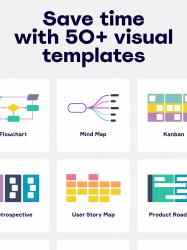
• Visualize ideas with a Mind Map
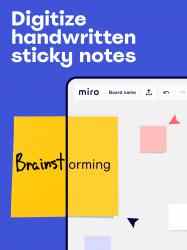
• Scan paper post-it notes and convert them into editable digital notes
• Upload images, pictures, docs, spreadsheets, and more
• Draw concepts and sketch new design ideas with touch or a stylus
• Convert pen drawings into shapes, sticky notes, and lines with Smart Drawing
• Use Lasso to select and move sketches, drawings, or text
• Use Highlighter to show important information during a meeting
• Transform your team collaboration and create an inclusive and engaging experience that works the way you do, with the power of Miro’s online whiteboard for Windows devices.
GET IN TOUCH
Any questions or comments? Get in touch by using this form: https://help.miro.com/hc/en-us/requests/new
We’ll be more than happy to help!
The Miro app is currently unavailable for Surface Hub users. Please use Miro on the latest Edge browser (version 85+) on your Surface Hub.
The list of AI features available in Miro is continually evolving. To ensure you have access to the most up-to-date and comprehensive information, we recommend exploring the detailed documentation available via the following link: https://help.miro.com/hc/en-us/articles/20970362792210-Miro-AI-overview. This resource will provide you with in-depth insights and guidance on leveraging AI capabilities to enhance your experience.
Miro: online collaborative whiteboard platform Features:. Miro: online collaborative whiteboard platform official app. Exclusive application for Miro: online collaborative whiteboard platform customers ...
Miro: online collaborative whiteboard platform Free Ringtones App... Miro: online collaborative whiteboard platform Cond Bold Italic.
- Create, view and edit your boards
Whether you're using Miro for brainstorming, design thinking, Agile or Scrum rituals, user journey mapping, product requirements, UX flows or process flows, or user subjects , the platform allows your gang troops to use an infinite canvas to change your physical whiteboard into a digital whiteboard.
- Convert sticky messages from a physical whiteboard into editable digital stickers with a single photo
- Content search inside boards
- Capture and organize your ideas