-
Downloads
-
Iphone
-
Games
-
GPS Camera 55. Field Survey
GPS Camera 55. Field Survey
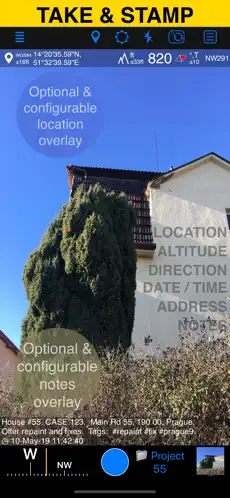
Capture photos and videos with precise location, date, address, and custom notes overlaid directly on them. Add hand-drawn annotations to photos for quick markups in the field. Easily search and filter your shots by title, tags, or notes — or sort them by proximity and date. Organize everything into folders or collections for structured reporting. Need to work with older photos? Import from your library and restore their location, direction, and notes automatically.
LOCATION OVERLAY
Supports decimal, DM, DMS, UTM, and MGRS coordinate formats.
True or magnetic heading, in degrees or mils.
Accuracy and altitude in feet or meters.
CAMERA AND CAPTURE SETTINGS
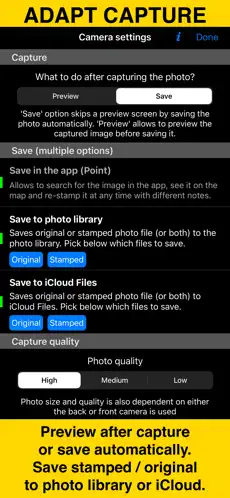
Save photos automatically or open in preview to annotate before saving.
Option to save a copy to the photo library — original, stamped, or both.
Record location-aware field video with map, QR code, watermark, speed, and motion overlays, then replay recordings in the app. The basic version stores one video and exports a branded clip of up to 15 seconds.
ANNOTATE AND COMMENT
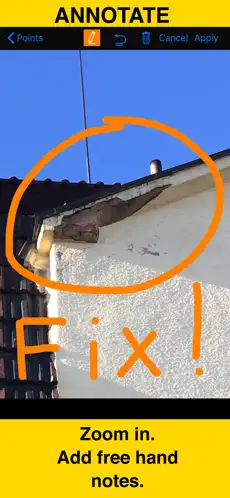
Before or after saving, zoom in/out and draw directly on the photo using your finger or Apple Pencil.
Crop, resize, rotate, or tilt the photo before or after saving.
Notes overlay supports Title, Note, Tags/Folder, and Address.
Address can be auto-filled from GPS or entered manually.
Edit notes and add annotations later (MENU > POINTS > tap an image).
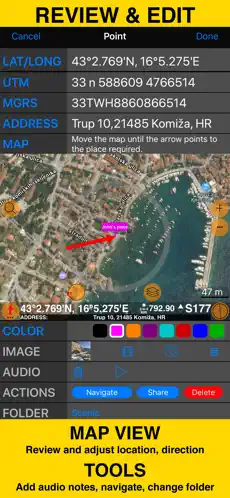
Tapping a point row opens the editor, where you can add an audio note.
Timestamps support many formats and languages.
Scan QR codes, barcodes, or text and use the result for the title or note field.
WATERMARK
The Pro Pack upgrade removes the basic version watermark and allows you to set up a watermark with your own image, text, and colors, if needed.
SHARE AND EXCHANGE
Share multiple points via MENU > POINTS, or entire collections via MENU > POINT COLLECTIONS.
Images can be shared with or without location/notes text, and with or without overlays.
Photo filenames can include title, note, address, tags/folder name, collection, coordinates, altitude, heading, or capture date.
To transfer complete points and images to another device, use KMZ (Google Earth archive) — includes photos, notes, annotations, and audio.
PDF REPORTS
Generate and share PDF documents for the selected photos/points or whole collection/folder, with options for the number of images per page and photo descriptions.
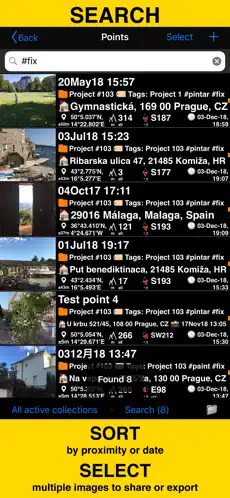
ORGANIZE, SEARCH & SORT
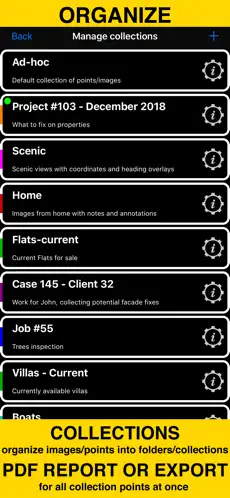
You can organize images into collections/folders. Existing images/points can be moved between collections.
Search by notes, address, or tags; filter by creation month; sort by proximity; or show only one collection.
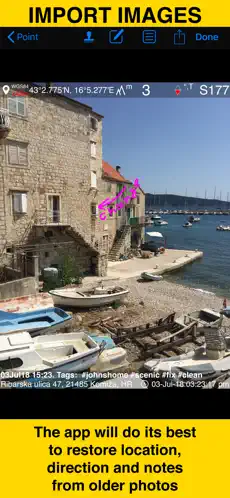
IMPORT
Import photos from your library. The app reads TIFF/EXIF/GPS/IPTC metadata to restore location, direction, and notes for the stamp.
NAVIGATE
Navigate back to any saved photo/point from its editor.
MAP VIEW
Review any saved photo/point and its location on the map.
== PRO PACK UPGRADE ==
You can do a lot with the basic functions in the app. The PRO PACK upgrade adds:
- Ability to create additional point/image collections.
- Enables sharing of more than 5 points/images at once.
- Export/import capabilities — in particular, KMZ export/import enables transfer of collections or selected waypoints between devices.
- Ability to save hand-drawn annotations for the image.
- Crop, resize, rotate, or tilt the photo before or after saving.
- Extra protection of your work and privacy with PIN code or biometric-based access options.
- Removes the basic version watermark and allows you to apply a custom watermark with your image, text, and colors.
- Unlimited saved videos and full-length stamped or original video exports.
Terms of Use: https://www.apple.com/legal/internet-services/itunes/dev/stdeula/
Applications MP3 Player GPS Cámara 55. Foto+ubicación.... GPS Cámara 55. Foto+ubicación. - free ringtone app.... Do not hesitate to download
GPS Cámara 55. Foto+ubicación. for
Iphone if what you are looking for in Downloads.com is the best of
Games 965 are the downloads that our users have already made in Downloads.com. El comentario de Alfredo Mas Photos can be used for Official documentation, quick replies from developer when we have questions or suggestions and i highly recommend it
We have no doubt that
GPS Cámara 55. Foto+ubicación. is a good application for everything related to
Games . GPS Cámara 55. Foto+ubicación. allows you to:.