-
Downloads
-
Windows
-
Utilities and tools
-
File Content Explorer Light
File Content Explorer Light
This is a restricted version of the app "File Content Explorer", which only displays the content of folders with a maximum of five files and limits the display of Office files and text comparison to 50 lines. The screenshots are from the unrestricted version, which is also available in the store.
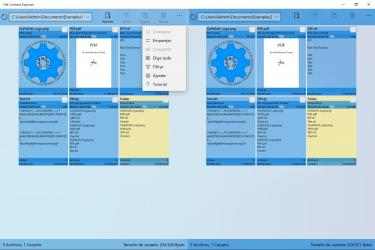
This app is a combination of a simple file manager and a file viewer with a practical preview function for all common file types. In addition to the overview, the file management functions also work in the detail view in order to ensure the most efficient file management possible. No installed programs are required to display the supported file types and all files can be viewed without risk, as no macros or scripts are executed. The use of separate programs for file operations and file viewing can be inefficient when managing a large number of files due to frequent program changes and the preview functions and thumbnails of Windows Explorer have several limitations in contrast to this app. Windows Explorer only shows the thumbnails and previews for harmless files and requires certain settings and installed programs for this. For example, Windows Explorer only shows Office files as a preview if they do not come from other computers, do not contain macros and a suitable Office program is installed, while thumbnails are only displayed for files that are already locally saved.
On the other hand, this app already shows as much of the content of the supported file types as possible in the overview and the delay-free preview, so that the detail view usually only has to be opened for a complete display of the content. The overview consists of two halves in which all items of a selected folder are displayed and between which various file operations can be carried out. Depending on the settings and the number of files, a flat view can be opened in one half via the context menu in which all files in the subfolders are displayed instead of the folders. Files whose format is not supported are displayed in the overview with their icon or as ASCII characters, while in the detail view, which can be opened by double-clicking, context menu or Enter key, they are initially displayed in hex format. In the detail view you can switch between content display and hex format for supported file types and each file can also be opened with the linked program. The overview can also be filtered according to various criteria, whereby any number of filters can be created and saved. In addition to the usual keyboard navigation and support of the delete key in the overview and the detail view, it is possible to search for items in the overview by their initial letter and use the backspace key to exit all views.
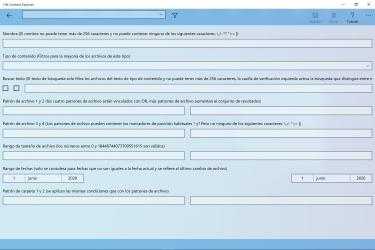
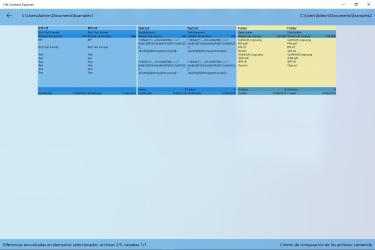
For file management, this app supports the file operations copy, mirror, delete, compare, and split. When mirroring, only new and modified files are copied to the target folder, where unnecessary files can also be deleted to keep it synchronized with the source folder. Additionally, SHA-256 hashes of files and folders can be created and compared via the context menu. When renaming a file, the file extension can be checked or suggested based on the content. The integrated file viewer can display and play text files, image files, video files, audio files, Office files in OOXML or ODF format, PDF files, RTF files, ZIP files, and folders. Filter criteria for each filter can be defined as content type, a search text or regular expression for the content of text and Office files, four OR-linked file patterns, a file size range, a date range, and two OR-linked folder patterns. Filtering by content also displays the corresponding results in the detail view. OOXML files from Word, PowerPoint, and Excel are displayed in this view either as plain text or with basic formatting and core document elements, with the formatted appearance closely resembling that of the respective program. Both display modes are also supported for ODF files, but without specific optimization for individual applications. The detail view can also display various structured text files in formatted form, which are listed separately in the associated description. In the comparison view, text-based files are displayed side-by-side in their unformatted state, and differences can be highlighted line by line and synchronized by automatically inserting blank lines for optimal line alignment.
Due to specific app restrictions, this app does not display files that have the System or Hidden file attribute set, and no folders that have the Hidden file attribute set. However, these file attributes are usually set only for various files or folders of Windows or some programs. In addition, these items are not included in any file operations. These restrictions also apply to the shortcut files with the file extension lnk and url. The only exception is deleting a folder, where corresponding items are also deleted.
If you were just looking for an app like
File Content Explorer Light , then you are in luck, you have already found the best alternative. Most third-party programs currently offered are somewhat slow and tedious, which is not the case with
File Content Explorer Light . Enjoy playing Funky Game File Content Explorer Light!...
After a while without new developments,
Gupasoft has launched File Content Explorer Light to the stores, an app that in its
Windows version more than does its job. Not only does it offer a system of constant communication between them and
Gupasoft but they are listened to and cared for correctly.
Biblio operations support copy, delete, and compare. The built-in file viewer is capable of displaying or playing text files, image files, video files, audio files, PDF files, RTF files, ZIP files and folders. For each filter, the filter criteria are capable of being the content form prototype, a search document or a regular expression for the content of the text files, four OR-linked file patterns, a range of file sizes , a date range, and two OR-linked folder patterns. Microsoft Office files of Word, PowerPoint and Excel are displayed as a paragraph with no way of being as writing files and therefore you are also able to compare line by line and filter according to their content, and the locations are displayed in the detailed view.