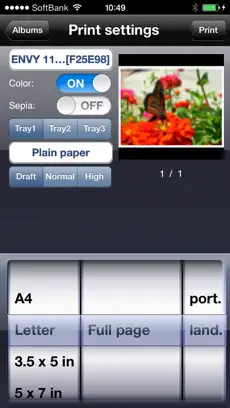
“ePrint” solves to print directory from iPad, iPhone or iPod touch.
“ePrint Free” is for trial application for “ePrint”.
Test “ePrint Free” with your printer first, and then get “ePrint” (Full version).
ePrint provides a lot of convenience!
*****
For ink-jet printer users:
Canon, brother, Samsung, Lexmark ink-jet printers are NOT available on ePrint/ ePrint Free.
*****
[Support Printers / PDL (Printer Description Language)]
Printers should be installed the following printer description languages.
Please check each printer manufacture web site to confirm what printer description language your printer has.
EPSON Inkjet Printer
- PDL: ESC/P-R (except for ESC/P raster)
EPSON Page Printer
- PDL: ESC/Page, ESC/Page-Color, ESC/Page-S (Color only)
HP Inkjet Printer
- PDL: PCL3GUI
HP Page Printer
- PDL: PCL (Except for HostBase model)
Canon Page Printer
- PDL: LIPS (Except for CAPT)
OKI Printers & Multifunction Printers
- PDL: PCL, PostScript
TOSHIBA MFP
- PDL: PCL,PS3
Canon, brother, Samsung, Lexmark or other manufacture’s Page Printer
Printers should be installed the following PDL.
- PCL
- PostScript
Canon, brother, Samsung, Lexmark or other manufacture’s Inkjet Printer
- NONE. (This application doesn’t work.)
[Tips for HP ink-jet printer user]
When "Failed to get printer control command" message appears, please set PDL to "PCL3GUI".
Also set "Port" is "Port9100", when register printer manually.
[Requirements]
Wi-Fi
Printer is connected on the network and printed through TCP/IP (LPR).
Printer should be available for SNMP.
Meet support printers conditions.
[Introduction]
If you have “ePrint” and required printers, you don’t need PC anymore.
You can print various contents such as contacts, photos, notes, Web pages or PDF files in your iPad, iPhone or iPod touch as you like.
Please test this “ePrint Free” with your printer first.
It supports 1 page and 1 format printing.
[Features]
1. Web page printing *1
- “ePrint” arranges linked PDF or image files before printing.
- You can save linked PDF or image files
- You can also specify print pages
2. Camera (24 formats)*2 (Borderless printing *1)
- Date stamp or time stamp function
3. Contacts (3 formats)*2
4. Albums. (24 formats) (Borderless printing support)*2
5. Note. (6 formats)*2
6. Photo calendar (5 formats)*2
7. Photo card (13 formats)*2
8. Clipboard *1
9. Add a printer. (Bonjour search / Enter IP address)
10. Print Settings
Color
Duplex (Limited printer models)
Sepia
Paper size
Orientation
Media type
Print image preview
11. Direct print for the Printer connected AirMac with USB *1
12. Print for the shared printer by Mac *1
13. Display consumable information (Limited printer models)
14. iDisk/ WebDAV *1
15. Back ground printing. (Since iOS4) *1
16. Support iPhone 4 Retina Display *1
17. Support files synchronized with iTunes (since iPhone OS 3.2 or iOS4) *1
*1: "ePrint" (Full version) only
*2: 1 format only available on “ePrint Free”
Produced by e-Workshop
Connect with ePrint Free efficiently and t... Search for this same title on other platforms if your device is not a
Iphone device. This
Utilities program is very easy to use. Como dice Maria Victoria Gallego The paid app may be able to handel borderless, i highly recommend this app! and not onyl that i don't know why this app doesn't have ratings or comments,
Don't hesitate to download
ePrint Free for
Iphone if what you are looking for in Downloads.com is the best of
Utilities ePrint Free has an interface that will allow the user to carry out operations without any complications. The official Android app for the ePrint Free....