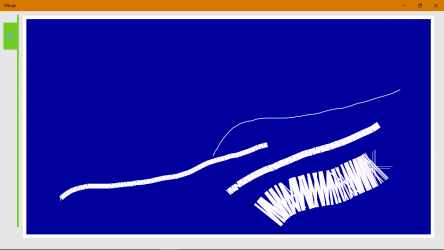
Dibujo,
is an application that allows you to use RGB colors to draw.
Select each of the RGB and gamma channels using the scroll controls.
As well,
you can use speech recognition to indicate each one; doing so will display the color; and, the scroll control will be located at the indicated value.
TOPICS
Use the voice recognition tool
Generate a history of each color
CANVAS COLOR: (the drawing space)
BACKGROUND COLOR: (gives the canvas frame)
PENCIL
Start drawing
Switch to the drawing canvas
Back to Settings
Delete a drawing
Delete points
Complete line
Delete all lines
Establish TRANSPARENCY
Green circumference
Generate a new canvas
Add an image
Image controls
Save the generated image
Exit application
Use the voice recognition tool
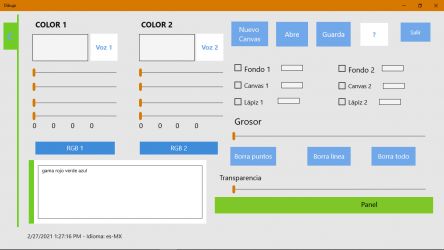
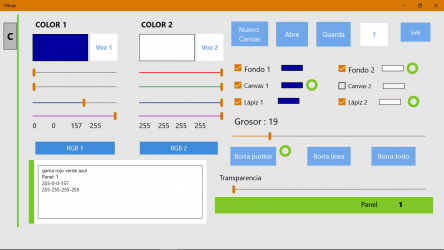
To the right of the rectangle that you will configure (Color 1 or color 2),
Click on the VOICE option,
Open the color panel: RED, GREEN, BLUE. SPECTRUM.
Selecting each option starts voice recognition:
dictate the CORRESPONDING RGB INTEGRAL NUMBER in the language of your system, it WILL VALIDATE WITH VOICE (turn on the speakers).
In the rectangle, the channel (R, G or B, GAMA) that you selected is configured.
Gama gives the transparency of the color, making the BACKGROUND combinable with CANVAS, and with the pencil. GAMA 255 is completely opaque.
At any time, use the scroll control to modify the values.
In both cases, it displays the color generated in the upper rectangles.
Generate a history of each color
click RGB1 or RGB2 color.
In that same history box, you can write your own descriptions to later copy to other applications.
Use this application to learn about and use RGB in other applications.
After setting the colors to Color 1 and / or Color 2.
Configure the space and / or pencil to apply the colors:
CANVAS COLOR: (the drawing space)
click Canvas 1 or Canvas 2.
Canvas 1: sets as the canvas color, the RGB color of COLOR 1.
Canvas 2: set as the canvas color, the RGB color of COLOR 2.
BACKGROUND COLOR: (gives the canvas frame)
click Background 1 or Background 2.
Background 1: sets as BACKGROUND color, the RGB color of COLOR 1.
Background 2: sets as BACKGROUND color, the RGB color of COLOR 2.
PENCIL
click Pencil 1 or Pencil 2.
Pen 1: Sets the RGB color of COLOR 1 as the pen color.
Pencil 2: Sets the RGB color of COLOR 2 as the pencil color.
You must select the thickness from one to 100. It is initially at zero.
Delete a drawing
Select one of the three erase options:
Erase points
Hovering over the canvas erases each point in the nearby area.
Complete line
depending on the color of the pencil color that is Active.
Clicking on the canvas, or holding down the pointer will erase the color line completely. If you only click it partially erases.
You can generate a stippling effect, it will depend on the number of lines, thickness and time you hold down.
You can configure previous colors,by reading the color history, voice recognition and / or slider to rearm the colors.
Unique properties of Dibujo:. Connect with Dibujo efficiently and seamlessly... Enjoy playing Dibujo....
Such has been the success of this application that the more than
949 users who have downloaded it have rated it highly. At the same time, it adds that it does not consume many resources, so it can be installed in almost any
Windows .